

If you have ever enforced MFA, tightened a firewall rule, scheduled a backup job, or written “no shared accounts” into an onboarding doc, you have already deployed security controls. That is the starting point for understanding security controls for IT professionals: a security control is any safeguard that reduces the risk of a threat hurting an asset. Controls are grouped two ways: by what they do (prevent, detect, correct, deter, recover, compensate, direct) and by how they are built (administrative, technical, physical).
So the move into a blue team role does not start from zero. What changes is not the tooling. It is the question you ask before touching anything: which control, against which threat, at what cost, and is it enough on its own?
This article walks through that question the way a defender answers it.
What is a security control?
NIST defines a security control as a safeguard or countermeasure for a system or organization that protects the confidentiality, integrity, and availability of the system and its information (NIST CSRC glossary, from SP 800-53 Rev. 5). Notice what that definition does not say: it does not say “software.” A control can be a person, a process, or a technology.
A control also never exists in a vacuum. It sits in a chain of four ideas:
- Asset: something worth protecting (a database, a laptop fleet, a domain controller, a customer list).
- Threat: something that can cause harm (a phishing campaign, a disgruntled admin, ransomware, a flood).
- Vulnerability: the weakness the threat exploits (no MFA, an unpatched VPN appliance, a flat network, no offsite backup).
- Control: what you put between the threat and the asset to reduce the likelihood or the impact.
Risk is what you get when a threat can exploit a vulnerability in something you care about. Controls exist to bring that risk down to a level the business can accept. They almost never bring it to zero, and that is fine.
The practical test: if you cannot name the threat a control addresses, you cannot tell whether it is working, or whether you are paying for it twice.
The types of security controls, by what they do
The most useful way to classify a control is by the job it does in the timeline of an attack: before, during, or after.
CompTIA Security+ (SY0-701) lists six types: preventive, deterrent, detective, corrective, compensating, and directive. ISC2’s CISSP material adds a seventh, recovery. We use all seven below, because “can we get back up and running?” deserves its own row.
| Type | Its job | When it acts | Examples you already know from IT |
|---|---|---|---|
| Directive | Tells people what they must or must not do | Before | Acceptable use policy, password policy, “no local admin on laptops” standard |
| Deterrent | Discourages the attacker from trying | Before | Login warning banners, visible cameras, a published disciplinary policy |
| Preventive | Stops the incident from happening | Before / during | MFA, firewall rules, least privilege, patching, disk encryption, badge doors |
| Detective | Spots the incident while or after it happens | During / after | SIEM alerts, EDR, IDS, log reviews, file integrity monitoring, audits |
| Corrective | Limits damage and fixes the immediate problem | After | EDR auto-quarantine, disabling a compromised account, reimaging a host |
| Recovery | Restores normal operations | After | Backups and restores, DR site failover, rebuild runbooks |
| Compensating | Substitutes for a control you cannot implement | Any | Isolating a legacy server you cannot patch, extra log review where separation of duties is impossible |
Four points that trip people up:
- Deterrent vs. preventive. A deterrent only works if the attacker chooses to stop. A warning banner has never blocked a single login. A preventive control works whether the attacker cares or not.
- Detective controls are worthless without a response. An alert nobody reads is just a log file with ambitions. Every detective control needs an owner and a corrective action behind it.
- Compensating is a role, not a technology. The same firewall rule can be preventive in one environment and compensating in another, depending on what it is standing in for.
- One control, several types. A camera deters (it is visible) and detects (it records). EDR detects, then corrects by isolating the host. Classify a control by the job you are counting on it to do.
The categories, by how they are built
The second axis is about implementation: who or what actually enforces the control. Here the certification bodies slice things slightly differently, which confuses a lot of people the first time.
The classic three-way split (used in CISSP material):
- Administrative: policies, procedures, training, background checks, risk assessments, vendor reviews. Enforced by people and process.
- Technical (logical): MFA, encryption, ACLs, firewalls, EDR, SIEM, DLP. Enforced by systems.
- Physical: locks, badge readers, guards, fences, cameras, environmental controls. Enforced in the physical world.
Security+ SY0-701 uses four categories instead: managerial, operational, technical, and physical. It splits “administrative” in two. Managerial controls are the decisions and oversight (policies, risk assessments). Operational controls are the things people carry out day to day (guard patrols, awareness training, log review routines). Same ideas, finer cut.
Put the two axes together and you get a grid. Every real control lands somewhere in it:
| Administrative | Technical | Physical | |
|---|---|---|---|
| Directive | Acceptable use policy | Login banner stating usage rules | “Authorized personnel only” sign |
| Deterrent | Published disciplinary policy | Account lockout warning | Visible cameras |
| Preventive | Background checks, separation of duties | MFA, firewall, least privilege | Badge-controlled doors |
| Detective | Quarterly access reviews | SIEM, EDR, IDS | Camera recordings, door alarms |
| Corrective | Incident response plan | Auto-quarantine, account disable | Replacing a broken lock |
| Recovery | DR plan and tabletop exercises | Backups, failover | Alternate site |
This grid is more than exam trivia. When you review a security program, empty cells are where gaps hide. A company with a packed Technical column and an empty Administrative column usually has great tools and nobody who knows what they are for.
How IT professionals should choose security controls: maximum coverage, minimum investment
The best control is not the most advanced one. It is the one that removes the most risk per dollar, per hour of effort, and per unit of friction for users. Defenders get there by starting from the threat, not from the vendor catalog.
Five questions do most of the work:
- Which threat does this address, and against which asset? No threat, no control. This is where most wasted security spend starts.
- How much of the risk does it actually remove? Does it cut likelihood, impact, or both? Does it cover one attack path or several?
- What does it really cost? License price is the smallest part. Count implementation hours, ongoing operations, training, and the productivity hit on users.
- What do we already have? Many organizations already own the control they are shopping for. It sits in a license tier nobody turned on.
- Can we prove it works? If you cannot test or measure a control, you are trusting it, not managing it.
If those questions sound like a change advisory board review, that is because they are. Sysadmins and network engineers already justify changes by impact, cost, and rollback. Security just adds “which threat?” to the front of the form.
A worked example: credential phishing
Threat: attackers phish employee passwords and use them to log in to email and SaaS apps. Here is how a few candidate controls compare:
| Control | Type | Coverage of this threat | Typical cost and effort |
|---|---|---|---|
| Phishing-resistant MFA (FIDO2 security keys / passkeys) | Preventive, technical | High: stolen passwords and most proxy-based phishing kits stop working | Moderate: keys or platform passkeys, plus rollout effort |
| App-based push MFA | Preventive, technical | Medium-high: blocks plain password reuse, weaker against MFA fatigue and proxy kits | Often already licensed |
| Email filtering and link rewriting | Preventive, technical | Medium: reduces volume, never catches everything | Usually bundled with the mail platform |
| Security awareness training | Directive / preventive, administrative | Low-medium on its own: lowers click rates, never to zero | Low cost, ongoing effort |
| Impossible-travel and risky sign-in alerts | Detective, technical | Medium: catches the login after the fact | Often in the identity platform already |
One family of rows clearly does the heavy lifting: MFA removes the most risk for this threat, and CISA explicitly recommends phishing-resistant MFA as the strongest form (CISA, Implementing Phishing-Resistant MFA, 2022). In many environments it is also partly paid for already. That is the pattern to look for: high coverage, existing investment, low user friction.
Watch for the trap in the other direction too. Buying a sophisticated anti-phishing platform while MFA is still optional is a textbook case of maximum investment, partial coverage.
One threat, many controls: “OR” vs. “AND”
When you map controls to a threat, you will hit two very different situations. Telling them apart is one of the clearest signs that someone thinks like a defender.
Situation 1: several controls can solve it (OR)
Sometimes different controls each reduce the risk to an acceptable level on their own. Then you pick one, usually the cheapest or the one you already own.
Example: sensitive data on lost laptops. Any one of these can be enough:
- Full disk encryption (BitLocker, FileVault)
- No local data at all: users work through VDI or a browser-only SaaS app
- Strict data classification that keeps sensitive files off endpoints
Deploying all three is not “extra secure.” It is paying three times for the same risk reduction. Pick the one that fits the environment and move the budget to a threat that is still uncovered.
Situation 2: controls only work together (AND)
Other threats cannot be handled by any single control. Each one covers a different stage of the attack, and a gap in one breaks the chain.
Example: ransomware. Backups are the classic answer, but backups alone fail if the attacker reaches the backup console with a stolen admin password and deletes them first. That is exactly why CISA’s ransomware guidance calls for offline, encrypted backups that are tested regularly, not just “backups” (CISA #StopRansomware Guide, 2023). A credible defense combines:
- Preventive: MFA on remote access and admin accounts, patching of internet-facing services
- Preventive: network segmentation so one infected host cannot reach everything
- Detective: EDR and alerting on mass file encryption or backup deletion
- Corrective: an incident response playbook that isolates hosts fast
- Recovery: immutable or offline backups, with restores actually tested
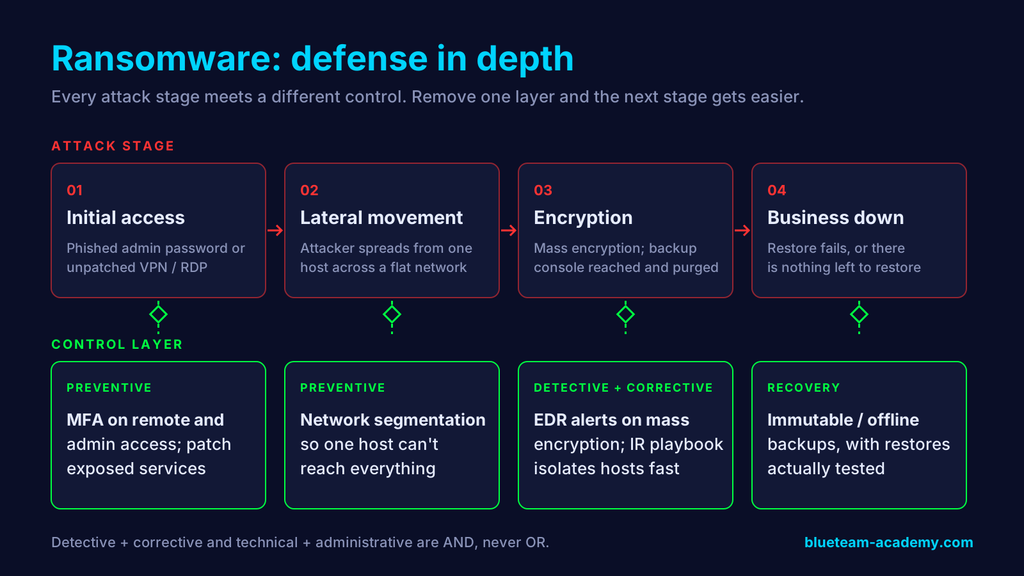
Each attack stage meets a different control. Remove any one layer and the next stage gets much easier. If you want the response side of this in detail, we broke it down in our ransomware response plan guide.
This is defense in depth. Think of each control as a slice of Swiss cheese: every slice has holes, but stacked together the holes rarely line up. Real breaches tend to happen when they do. In the 2017 Equifax breach, an unpatched web framework (a missing preventive control) met a network monitoring device that had been blind for months because of an expired certificate (a failed detective control). We walk through it in how two missed controls turned into the Equifax breach.
Two pairings are almost always AND, never OR:
- Detective + corrective. Detection without a response just documents the breach.
- Technical + administrative. A tool without a policy and an owner gets misconfigured, ignored, or quietly turned off.
Policies, standards, procedures, and guidelines
Controls do not float on their own. In a mature organization they hang from a documented hierarchy, and knowing it lets you read any security program in minutes. It is also exactly the vocabulary GRC interviews use.
| Document | What it says | Mandatory? | Example |
|---|---|---|---|
| Policy | The what and why, set by leadership | Yes | “All access to company systems requires strong authentication.” |
| Standard | The specific, measurable what | Yes | “MFA is required for all remote, admin, and SaaS access.” |
| Baseline | The minimum secure configuration for a system type | Yes | CIS Benchmark settings for Windows Server |
| Procedure | The step-by-step how | Yes | The “enroll a new hire in MFA” runbook |
| Guideline | Recommended practice and advice | No | “Prefer passkeys or hardware keys over SMS codes when available.” |
Guidelines are the flexible layer. They tell people what good looks like without forcing a single path, which makes them ideal where technology changes faster than policy can.
Don’t invent controls from scratch: use a framework
You do not need to design a control catalog yourself. Established frameworks already map threats to controls:
- CIS Critical Security Controls v8.1: 18 prioritized controls, split into Implementation Groups so smaller teams know where to start. The closest thing to a built-in “max coverage, least investment” list.
- NIST Cybersecurity Framework (CSF) 2.0: released in February 2024, it organizes outcomes into six functions: Govern, Identify, Protect, Detect, Respond, Recover. We cover it in NIST CSF explained.
- NIST SP 800-53 Rev. 5: the large, detailed control catalog behind US federal systems (and FedRAMP).
- ISO/IEC 27001:2022 Annex A: the international standard’s control set, 93 controls in four themes (organizational, people, physical, technological), common in global companies.
The frameworks tell you which controls exist. They do not tell you which ones your environment needs first. For a side-by-side of when each framework fits, see our guide to choosing a cybersecurity framework when you come from IT.
Where controls fit in the bigger picture
Notice the order this article followed: asset, then threat, then control. That order is the whole point. Controls are step three of a defender’s reasoning, never step one. Skip the threat step and you end up buying tools to answer questions nobody asked; that is why threat modeling for IT professionals comes before any control decision.
At Blue Team Academy we teach this sequence as the Threat & Control Method:
- Inventory: what exists and what is critical (your Asset Inventory)
- Threats: what can go wrong and what to prioritize (your Threat Model)
- Controls: which gaps to close and with what (your Security Plan)
- Scale: the same reasoning applied to any technology (your Repeatable Decision Process)
It is also the backbone of a realistic blue team career path for people already working in IT.
If you come from infrastructure, networking, or help desk, you are not starting from zero. You have deployed most of the controls in this article. Cybersecurity is not rocket science; what changes is learning to justify each control by the threat it answers, and to spot when one control is enough and when you need several. That is the skill that makes a resume stop reading like “support” and start reading like “security.”
Key takeaways
- A security control is any safeguard that reduces risk to an asset. People, process, and technology all count.
- Classify controls by what they do (directive, deterrent, preventive, detective, corrective, recovery, compensating) and how they are built (administrative/managerial, operational, technical, physical).
- Start from the threat, never from the product. No threat, no control.
- Look for high coverage, existing investment, low friction first.
- Know when controls are OR (pick one) and when they are AND (you need all of them).
Want the full method, step by step? The Blue Team Academy program walks through each phase of the Threat & Control Method with real scenarios, so you can turn the controls you already run into security experience employers recognize.
Prefer to start lighter? Subscribe to the Keep IT Safe newsletter for practical blue team breakdowns like this one, delivered without the hype.
