

Your web server just ran whoami. Nobody on your team typed it.
That one line in a process log is what remote code execution (RCE) looks like from the defender’s side. Not a Hollywood hacker montage, just a web service doing something it has no business doing. The good news for anyone coming from IT: the skills you need to detect remote code execution are mostly skills you already use every week. Reading process trees. Knowing which service account runs what. Noticing when a server talks to a host it never talks to.
This guide breaks RCE down the way a blue team actually works it: what it is, how it happens, how to tell if you’re exposed, how to fix it, and how to catch it while it’s happening.
What is remote code execution (and how is it different from remote command execution)?
Remote code execution is a class of vulnerability where someone on the network makes your server, application, or edge device run instructions of their choosing, without physical access and often without logging in.
You’ll see the label on a lot of critical CVEs, because the outcome is about as bad as it gets: the attacker stops being a visitor and starts being an operator on your host.
People use “remote code execution” and “remote command execution” interchangeably. The distinction is worth knowing, because it changes where you look for evidence:
| Remote code execution | Remote command execution (command injection) | |
|---|---|---|
| Where it runs | Inside the application runtime (JVM, Python interpreter, PHP engine) | In the operating system shell (sh, bash, cmd.exe, powershell.exe) |
| How it gets there | Malicious script logic, bytecode, or object data the runtime executes | Untrusted input passed into a shell command |
| Typical root causes | Insecure deserialization, template injection, memory corruption | String concatenation into system(), exec(), popen() |
| Where defenders often see it | Unusual behavior from the app process itself, then usually a shell | A new child process under the web service |
Different entry point, same destination. In both cases, the attacker ends up executing with the privileges of whatever account your service runs as. Which is why “what account does this run as?”, a question every sysadmin already asks, turns out to be a security question.
How an RCE attack actually unfolds
Most RCE intrusions follow a predictable five-step arc. Knowing the arc matters more than memorizing any single exploit, because every step leaves evidence somewhere you already have logs.
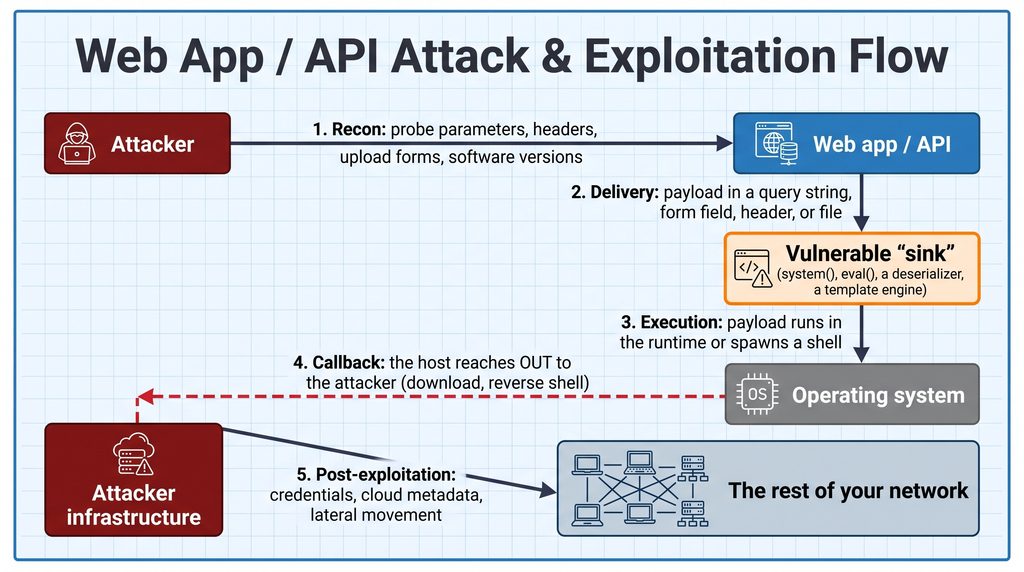
A few details worth calling out:
- The “sink” is the whole game. A sink is any function that treats data as something to execute. The vulnerability exists when untrusted input reaches a sink without being constrained first.
- Step 4 is outbound. A reverse shell is your server opening a connection to the attacker. That’s why egress control (step 4) is one of the most underrated RCE defenses, and it’s a network control, not a coding fix.
- Step 5 runs as your service account. If the app runs as
www-datawith nothing interesting readable, the attacker has a bad day. If it runs asrootorSYSTEM, or the environment variables hold cloud keys, your bad day gets much worse.
The five most common RCE vectors
RCE isn’t one bug. It’s an outcome that several different flaws produce.
1. OS command injection
The classic. An application builds a shell command by gluing user input into a string.
python
import os
from flask import Flask, request

app = Flask(__name__)

# Vulnerable "network diagnostics" feature
@app.route("/api/ping")
def ping_host():
    ip = request.args.get("ip")
    # Flaw: user input concatenated straight into a shell command
    return os.popen(f"ping -c 1 {ip}").read()
Send 8.8.8.8 and you get a ping. Send 8.8.8.8; id and the shell treats the semicolon as a command separator, so it pings and then runs id. Any admin who has chained commands with ; or && already understands this attack. That’s the point: the shell is doing exactly what shells do.
2. Insecure deserialization
Serialization turns an in-memory object into bytes for storage or transport; deserialization rebuilds it. If an application deserializes untrusted data with a native engine (Java’s ObjectInputStream, Python’s pickle, PHP’s unserialize), a crafted object can trigger code during reconstruction. Enterprise Java middleware has a long history of critical bugs in this category.
The defender’s takeaway: if you see a service accepting serialized objects from the network, that’s a high-value item for your threat model, regardless of how “internal” it’s supposed to be.
3. Unrestricted file upload
An app lets users upload a profile picture or document but doesn’t validate type, extension, or storage location. The attacker uploads a script (.php, .jsp, .aspx), it lands in a directory the web server will execute from, and browsing to it runs it. That file is a web shell, a browser-based backdoor that persists across reboots because it’s just a file on disk.
4. Server-side template injection (SSTI)
Template engines (Jinja2, Twig, Freemarker) render dynamic pages. If user input is baked into the template itself instead of being passed in as data, the attacker can write template expressions that reach into the underlying language and, from there, the OS.
python
# Vulnerable: user input becomes part of the template definition
template = f"Hello {user_input}!"
render_template_string(template)

# Safer: the template is fixed; user input is passed as data
render_template_string("Hello {{ name }}!", name=user_input)
A common first probe is harmless-looking math like {{7*7}}. If the page renders 49, the engine is evaluating input. That pattern is also a useful detection signal in your web logs.
5. Vulnerable third-party libraries
Sometimes your code is fine and a dependency isn’t. Log4Shell (CVE-2021-44228), disclosed in December 2021, is the reference case: the widely used Java logging library Log4j 2 would interpret specially formatted strings in logged data and perform a JNDI lookup to an attacker-controlled server, which could result in loading and executing remote code. Attackers only had to get a string like ${jndi:ldap://...} into anything that got logged, such as a User-Agent header.
Log4Shell is the best argument for why Inventory comes first. Teams that already knew which systems ran Log4j 2 could start patching right away. Teams that didn’t first had to find out, and many spent weeks doing it.
If you want a real breach built on this exact pattern, our Equifax breach breakdown walks through how an unpatched Apache Struts RCE (CVE-2017-5638) became one of the largest data breaches in US history.
How to check whether you’re exposed
You don’t need to be an application security engineer to start here. You need a list, and then you need to test what’s on it.
Start with Inventory, not scanners
Before any tool, answer three questions about each internet-facing service:
- What is it, and what’s it built on? Language, framework, major libraries, version.
- What account does it run as, and what can that account reach? Files, secrets, environment variables, cloud credentials, other hosts.
- Does it accept input that could reach a sink? Upload forms, “diagnostic” features, anything that takes a hostname or filename, anything that deserializes objects.
This is the Inventory step of the Threat & Control Method, applied to one threat. The output is an Asset Inventory that tells you where RCE would hurt most, which is where testing should start.
Static analysis and code review
If you have source access, search for dangerous sinks and trace whether user input can reach them:
- PHP:
system(),exec(),passthru(),shell_exec(),eval(),unserialize() - Python:
os.system(),os.popen(),subprocess.*(..., shell=True),eval(),pickle.loads() - Node.js:
child_process.exec(),eval(),vm.runInNewContext() - Java:
Runtime.getRuntime().exec(),ProcessBuilder,ObjectInputStream,XMLDecoder
Tools like Semgrep, CodeQL, and SonarQube automate this “does input flow into a sink?” question (taint analysis).
Dependency scanning
Most modern applications are built largely from open-source packages, so your exposure lives in the dependency tree as much as in your own code. Run software composition analysis (Trivy, npm audit, pip-audit, or similar) in CI/CD, and cross-check findings against CISA’s Known Exploited Vulnerabilities catalog to prioritize what attackers are actually using.
Dynamic testing
Many RCE bugs are blind: the command runs, but output never comes back in the HTTP response. Testers prove execution with out-of-band callbacks, injecting a payload that makes the server perform a DNS lookup or HTTP request to a domain they control. OWASP ZAP and Nuclei templates cover many known injection patterns. Only test systems you own or are explicitly authorized to test.
How to fix and prevent RCE
Prevention has two layers: fix the code, and build the environment so a code flaw doesn’t become a full compromise. IT professionals tend to have the most leverage on the second layer.
Don’t hand input to a shell
If an application must call a system binary, pass arguments as a list and skip the shell entirely. Then validate the input against what it’s supposed to be.
python
import ipaddress
import subprocess
from flask import Flask, request

app = Flask(__name__)

@app.route("/api/ping")
def ping_host():
    # Allowlist validation: it must be a real IP address, nothing else
    try:
        ip = str(ipaddress.ip_address(request.args.get("ip", "")))
    except ValueError:
        return "Invalid IP address", 400

    # No shell: the OS runs the ping binary directly with discrete arguments,
    # so ; | && and friends are just characters, not syntax
    result = subprocess.run(
        ["ping", "-c", "1", ip],
        capture_output=True, text=True, timeout=5, shell=False,
    )
    return result.stdout
Allowlist, don’t blocklist
Stripping ; and | doesn’t work. Shells offer too many alternatives: newlines, $() subshells, backticks, variable expansion. Define what valid input looks like (an IP, an integer, a UUID, a fixed set of values) and reject everything else.
Lock down file uploads
- Store uploads outside the web root, ideally in object storage (S3, GCS, Azure Blob)
- If they must live on local disk, mount that path
noexecand make sure the web server won’t execute scripts from it - Re-encode images on upload to strip embedded content
- Randomize filenames so uploaded files can’t be guessed and browsed to
Harden the host so one bug stays one bug
This is defense in depth, and it’s mostly infrastructure work:
- Least privilege. Never run web apps as
rootorAdministrator. Dedicated service accounts, minimal file permissions, no secrets in readable environment variables if you can avoid it. - Read-only, unprivileged containers. In Kubernetes:
yaml
securityContext:
  runAsNonRoot: true
  runAsUser: 10001
  readOnlyRootFilesystem: true
  allowPrivilegeEscalation: false
  capabilities:
    drop:
- ALL- Egress filtering. Application servers rarely need to initiate connections to arbitrary internet hosts. Default-deny outbound from app tiers, allow only what’s required (package mirrors, specific APIs), and you’ve broken step 4 of the attack arc: no download, no reverse shell, no blind callback.
- Protect cloud metadata. On AWS, require IMDSv2 and keep the hop limit low so a compromised workload can’t trivially pull instance credentials from
169.254.169.254.
If you’ve ever written a firewall rule or set up a service account, you already know how to do most of this. The security part is knowing why it matters, so you prioritize it.
How to detect active RCE exploitation
Here’s where blue teams earn their keep. Exploitation looks different from normal operations, and you can see it at three layers.
Host and process: the highest-fidelity signal
In a healthy environment, web server and application processes almost never spawn interactive shells or recon utilities. When nginx or php-fpm becomes the parent of bash, or w3wp.exe launches cmd.exe, you should want to know immediately.
Parent processes to watch: nginx, apache2, httpd, php-fpm, w3wp.exe, java, node, python, tomcat
Suspicious children: sh, bash, dash, cmd.exe, powershell.exe, whoami, id, uname, curl, wget, nc, certutil.exe
You can capture this with an EDR agent, Sysmon on Windows (Event ID 1, process creation), or auditd (or Sysmon for Linux) on Linux. Here’s the logic expressed as a Sigma rule:
yaml
title: Web Server Process Spawning Shell or Recon Utility
status: experimental
description: Detects a Linux web server process spawning a command interpreter or common reconnaissance and download tools, a strong indicator of remote code execution or a web shell.
logsource:
  category: process_creation
  product: linux
detection:
  selection:
    ParentImage|endswith:
      - '/nginx'
      - '/apache2'
      - '/httpd'
      - '/php-fpm'
    Image|endswith:
      - '/sh'
      - '/bash'
      - '/dash'
      - '/curl'
      - '/wget'
      - '/whoami'
      - '/id'
      - '/nc'
  condition: selection
falsepositives:
  - Legitimate application features that shell out (e.g., mail via sendmail, image processing wrappers). Baseline and allowlist known parent/child/command-line combinations.
level: high
The falsepositives line matters. Some real applications do shell out, PHP’s mail() being a frequent example. Baseline first, allowlist the known-good command lines, then alert on everything else. That tuning step is where operational experience pays off: you know what normal looks like on your servers.
Also watch for new files appearing in web directories and writable scratch paths like /tmp and /dev/shm, which is where downloaded payloads and web shells tend to land.
Network and egress telemetry
- Outbound connections from app tiers to unfamiliar destinations, odd ports, or dynamic DNS providers
- A server that never initiates outbound traffic suddenly doing so
- Bursts of DNS queries with long, random-looking or encoded subdomains, a common sign of out-of-band exploitation attempts
If you already have firewall and VPC flow logs, this is a query, not a project. Our guide to packet capture analysis covers the next layer down.
Web and WAF logs
- WAF rule hits for injection patterns (the OWASP Core Rule Set covers many):
; id,| whoami,${jndi:,{{7*7}}, encoded traversal like..%2f - Spikes in 500 errors following requests with strange parameters, often a sign someone is fuzzing a sink
- Requests for files in upload directories that end in executable extensions
On their own, WAF hits mostly tell you someone is trying. Correlated with a process alert on the same host, they tell you someone succeeded. That correlation is what a SOC does all day, and it’s why log analysis practice pays off.
RCE defense checklist
| Layer | Action |
|---|---|
| Inventory | List internet-facing services, their stacks, their service accounts, and what those accounts can reach. |
| Code | Remove shell invocation with user input; use argument lists and allowlist validation. |
| Dependencies | Run SCA in CI/CD; prioritize anything listed in CISA’s KEV catalog. |
| Host | Run as non-root, read-only filesystems, drop capabilities, noexec on upload paths. |
| Network | Default-deny egress from app tiers; protect cloud metadata endpoints. |
| Detection | Alert on web processes spawning shells; correlate with WAF and egress anomalies. |
Why this matters if you’re moving from IT into security
Look back at that checklist. Most of it isn’t exotic. Service accounts, mount options, firewall rules, process trees, log queries. If you’ve run infrastructure, you’ve done versions of all of it. What changes in a security role is the reasoning: you start from “what could go wrong here, and how would I know?” instead of “is it up?”
Cybersecurity is not rocket science. RCE is a good example of a “scary” topic that turns out to be a structured problem: know your assets, understand the threat, choose controls that break the attack chain, then apply the same thinking to the next service. That’s the Inventory → Threats → Controls → Scale loop, and it works the same way whether the threat is RCE, ransomware, or a compromised identity.
If you want to see how that reasoning maps onto actual roles, from SOC analyst to detection engineering, start with our breakdown of blue team jobs for IT professionals. And if you’d rather follow a structured path than piece it together alone, our program walks through the Threat & Control Method step by step, built for people who already work in IT.
For more practical breakdowns like this in your inbox, join Keep IT Safe, the Blue Team Academy newsletter: sign up for Keep IT Safe.
