

You’ve drawn a hundred network diagrams. You’ve probably never drawn a trust boundary on one on purpose.
That gap is what threat modeling for IT professionals closes. Threat modeling is a structured way to find out what can go wrong with a system before someone makes it go wrong: you map what you’re running, ask how it could be abused, decide what to do about it, and check your work. If you already run infrastructure, you answer the first of those questions every day. The other three are learnable, and they’re what separate “the person who keeps the system up” from “the person who decides how it should be defended.”
This guide walks through what threat modeling is, a full example on a system you’d recognize from any IT shop, where the practice actually comes from, and how to run your first one on something you manage this week.
What threat modeling is (and what it isn’t)
IT troubleshooting works backward from a symptom:
“Database CPU is pinned at 100%.” “Users can’t authenticate against LDAP.”
Threat modeling works forward from the design:
“If someone can see traffic between the app server and the database, what can they read or change?”
It is not running Nessus or Qualys and sorting the output by CVSS score. A vulnerability scanner finds known bugs in software that already exists. Threat modeling examines design decisions and assumptions: the things that are working exactly as built, and are still a problem.
A scanner will never flag “any host on the internal network can call this API without a token,” because nothing is technically broken. The system does what someone designed it to do. That’s precisely the class of problem threat modeling exists to catch.
The four questions
Adam Shostack, who spent years running threat modeling work at Microsoft, boiled the practice down to four questions. They’re now the most widely used framing in the field:
- What are we working on?
- What can go wrong?
- What are we going to do about it?
- Did we do a good job?
If those look familiar, they should. They line up closely with the Threat & Control Method we teach at Blue Team Academy: Inventory answers the first question, Threats the second, Controls the third, and Scale turns the fourth into a habit instead of a one-time review. The main difference is emphasis. Our Inventory phase explicitly catalogs the controls you already have, because you can’t judge a gap until you know what’s covering it today. If you want the full picture of how those phases connect, we break it down in the Threats phase of the Threat & Control Method.
A threat modeling example for IT professionals: the internal HR portal
Theory is cheap. Here’s a system that looks like something you’ve deployed or supported.
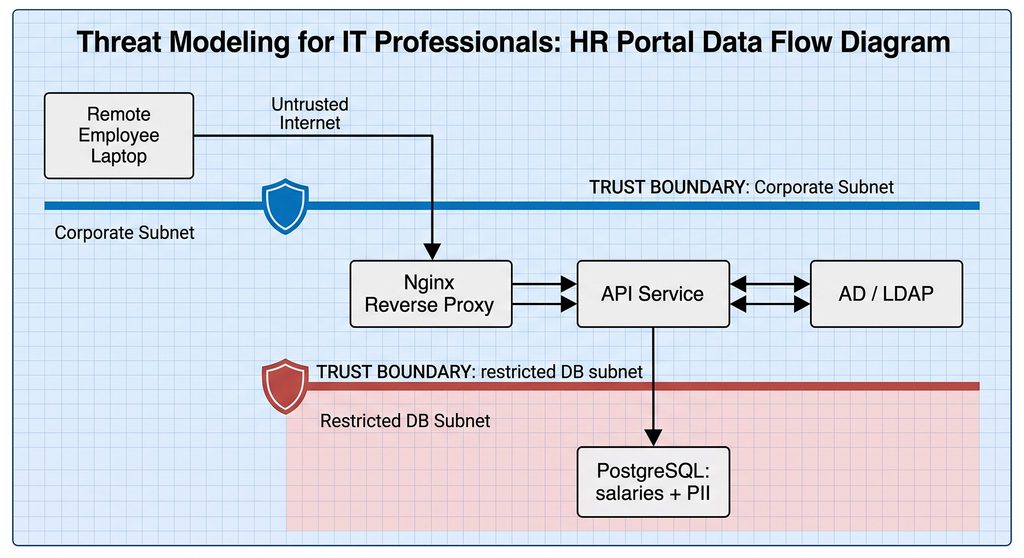
Your team is standing up an internal employee HR portal, hosted on-prem on a hypervisor or inside a cloud VPC. The components:
- A web front end (Nginx or Apache) acting as a reverse proxy
- A back-end API service
- A PostgreSQL database holding employee salaries and PII
- Active Directory / LDAP for single sign-on
Step 1: Decompose the system (What are we working on?)
You can’t defend what you haven’t mapped. Write down three things:
- Assets: what’s worth protecting. Employee PII, payroll data, API secrets, service account credentials.
- Data flows: how data moves. Browser → reverse proxy → API → database, plus the auth call out to LDAP.
- Trust boundaries: every point where data crosses from one level of trust to another. Internet to corporate network. Corporate network to the database subnet. A user’s request to a privileged service account.
Trust boundaries are the part most IT diagrams leave out, and they’re where most of the interesting threats live.
Step 2: Find what can go wrong (STRIDE)
The most common way to structure question two is STRIDE, a threat classification created at Microsoft. Each letter is a category of threat, and each one is the opposite of a security property you already care about:
| Threat | Property it breaks | What it looks like in the HR portal |
|---|---|---|
| Spoofing | Authentication | An attacker replays a stolen session token and acts as an HR manager. |
| Tampering | Integrity | Someone with a foothold on the corporate subnet alters salary records over an unencrypted API-to-database connection. |
| Repudiation | Non-repudiation | An admin changes a record and denies it, because the only logs lived on the server they controlled. |
| Information disclosure | Confidentiality | Nightly database backups sit on an SMB share readable by all domain users. |
| Denial of service | Availability | A flood of bogus auth requests saturates LDAP, and logins fail across the company, not just for the portal. |
| Elevation of privilege | Authorization | The API runs as a Domain Admin service account, so a single code-execution bug hands over the domain. |
A useful refinement is STRIDE-per-element: not every threat applies to every component. A data flow can be tampered with or read, but it can’t be spoofed (the endpoints can). A data store can be tampered with, but it doesn’t elevate privilege on its own. Matching categories to element types keeps the exercise focused instead of producing a 200-row spreadsheet nobody reads.
Step 3: Decide what to do about it
Every threat you keep gets a response. For the HR portal:
- Spoofing (stolen credentials or tokens): phishing-resistant MFA (FIDO2/WebAuthn), short session lifetimes, and conditional access policies.
- Tampering / disclosure in transit: TLS on the API-to-database connection, with certificate-based client authentication so the database only talks to the API.
- Repudiation: ship logs off the host to a centralized SIEM or remote syslog, append-only, with synchronized time (NTP). Logs an admin can edit don’t prove anything.
- Elevation of privilege: run the API under a least-privilege service account (a Group Managed Service Account on Windows, a dedicated non-root user on Linux), and constrain the process with SELinux or AppArmor.
Notice that “accept the risk” is also a valid answer, as long as someone with the authority to accept it actually does, in writing.
Step 4: Check your work (Did we do a good job?)
- Did we capture every external integration, like the third-party payroll provider’s API?
- Are the mitigations actually deployed and tested, or are they aspirational notes on a whiteboard?
- Is whatever risk remains within what the business has agreed to tolerate?
- When does this get revisited? A threat model that’s never updated describes a system that no longer exists.
Why threat modeling matters for blue teams
If you work in operations, a fair question is: “We already have EDR, a next-gen firewall, and automated patching. Why add this?”
Security tools can’t detect “flawed by design”
EDR and firewalls look for malicious behavior and known-bad patterns. They have no opinion on whether your architecture makes sense. If the API trusts every internal host, nothing alerts, because nothing malicious executed. The system worked exactly as built; it was just built insecurely. This is the same idea behind zero trust for IT professionals: being on the network shouldn’t be the same as being trusted.
Fixing a design is cheaper than fixing production
You’ll often see a precise multiplier quoted for how much more a defect costs after release. We’re not going to repeat one, because the popular figures are poorly sourced. The direction, though, is something every IT pro has lived: moving a box on a diagram costs an afternoon; re-architecting a deployed system costs maintenance windows, change approvals, regression testing, and probably a weekend.
It gives vulnerability management context
Consider two hypothetical findings:
- CVSS 9.8: an internal reporting server on an isolated VLAN, no outbound internet, reachable from three admin workstations.
- CVSS 7.2: a public-facing API gateway terminating customer connections.
Sorting by score alone puts the 9.8 first. A threat model tells you which asset sits on a critical trust boundary with real exposure, and that’s usually the 7.2. (Whether a CVE appears in CISA’s Known Exploited Vulnerabilities catalog is another input worth checking.) This is the core argument behind risk-based cybersecurity: severity is a property of the bug, risk is a property of your environment.
What it looks like when teams skip it
None of this is dramatic. It’s just expensive and tiring.
- Bolt-on architecture. Teams buy point products (DLP, CASB, WAF) to wrap around designs that were never examined, then maintain a growing pile of firewall exceptions and proxy rules to keep everything working.
- A noisier SOC. Systems deployed without anyone asking “what would abuse look like here?” also get deployed without the logging to tell normal from abnormal. Analysts spend their time on ambiguous alerts instead of real investigations.
- Late-stage rework. A new backup platform goes live, and months later an audit finds the backup storage shares encryption keys with production. Now it gets re-engineered under deadline pressure, when a design review would have caught it on day one.
Where threat modeling comes from
Threat modeling isn’t a vendor buzzword. It has a longer history than most of the tools on your network:
- 1962 – Fault tree analysis. Bell Labs developed fault tree analysis to evaluate the Minuteman missile launch control system. It’s the engineering ancestor of the tree-based thinking security later borrowed.
- 1994 – Threat trees. Ed Amoroso described decomposing threats into trees in Fundamentals of Computer Security Technology.
- 1999 – Attack trees and STRIDE. Bruce Schneier popularized attack trees, where the root is the attacker’s goal and the branches are ways to reach it. That same year, Loren Kohnfelder and Praerit Garg wrote an internal Microsoft paper introducing STRIDE. It was the first to structure how to find threats, not just catalog them.
- 2002 – Trustworthy Computing. Bill Gates’ memo made security a company-wide priority at Microsoft, and the work that followed became the Security Development Lifecycle, with threat modeling as a core practice.
- 2014 – Threat Modeling: Designing for Security. Adam Shostack’s book took the practice out of Microsoft and made it accessible to everyone else.
Where threat modeling shows up in standards
For a US-based IT pro, threat modeling isn’t just a good idea. It’s written into frameworks you’re likely to run into:
- NIST SP 800-53 Rev. 5, control SA-11(2) (“Threat Modeling and Vulnerability Analyses”) requires developers of systems and components to perform threat modeling during development and testing. It’s part of the FedRAMP Moderate and High baselines, so it matters anywhere federal cloud work is in play.
- NIST SP 800-218 (Secure Software Development Framework), practice PW.1.1 calls for risk modeling, including threat modeling, to assess the security risk of software.
- CIS Controls v8, safeguard 16.14 is literally titled “Conduct Threat Modeling.”
- OWASP SAMM includes threat modeling within its Threat Assessment practice.
- PCI DSS 4.0.1 doesn’t use the phrase, but Requirements 6.2.1 and 6.2.4 require secure development and defined methods to prevent common attacks in custom software. Threat modeling is one of the most common ways teams meet them.
If you’re mapping these frameworks against each other for the first time, our guide to cybersecurity frameworks for IT professionals is a good place to orient.
How to start threat modeling this week
You don’t need a security title to do this. You need one system and an hour.
1. Pick one small system
Not the whole enterprise. One service:
- A jump box / bastion host
- An SFTP server external vendors use
- A print management server (seriously, these are underrated)
- An S3 bucket pipeline for log backups
2. Draw it, with the boundaries
Paper, Excalidraw, draw.io, or Visio all work. Mark where users sit, where data is stored, and every dotted line where trust changes. For each boundary, answer one question: where does authentication happen here, if anywhere?
3. Run STRIDE per element
Walk each component and ask the relevant questions:
- Can this data store be tampered with? Who has write access?
- Can this traffic be read in transit? Is it HTTP where it should be HTTPS?
- Can this service elevate privilege? Is it running as Domain Admin when a gMSA would do?
4. Write it down
A threat model you can’t hand to someone else isn’t finished. Many teams keep them as Markdown files right next to the infrastructure-as-code they describe, so they get reviewed when the system changes. Two free tools worth knowing:
- OWASP Threat Dragon: open source, web or desktop, supports STRIDE.
- Microsoft Threat Modeling Tool: free, Windows-only, generates threat lists from data flow diagrams.
A note on using this in your portfolio
A threat model is one of the strongest artifacts you can show a hiring manager, because it demonstrates reasoning, not just tool familiarity. But don’t publish your employer’s real architecture. Rebuild the system in a home lab, model that version, and show it as a sanitized write-up. We cover how to structure that kind of evidence in cybersecurity portfolio examples.
The shift: invert what you already know
Moving from IT into security isn’t about throwing out your infrastructure knowledge. It’s about pointing it in a different direction.
You’ve spent years asking: “How do I keep this available and fast?”
Threat modeling adds: “How could this be abused, and what in the design stops that?”
Cybersecurity is not rocket science. You already know where the data flows and what breaks when a component fails. Threat modeling gives that knowledge a structure that security teams recognize, and it’s one of the clearest signals that you think like a defender, not just an operator.
Want the method, not just the concept? Threat modeling is the Threats phase of a larger decision process. The Blue Team Academy program walks through the full Threat & Control Method, including how to prioritize what you find and turn it into a Security Plan the business can act on. Built for IT professionals who want a realistic path into defensive security. See how the program works →
Not ready for that yet? Get one practical breakdown like this in your inbox with the Keep IT Safe newsletter. Subscribe to Keep IT Safe →

One response to “Threat Modeling for IT Professionals: You Already Do Half the Work”
[…] Then you’ll run your first threat model on one small system in about an hour. Want the diagram, the STRIDE table, and every source? Read the full written guide. […]